
The official Claude Code docs cover installation and commands. They do not cover what keeps AI-generated code from breaking in production. Here are the five practices that held up across 36,000 lines of shipped code: plan before touching multiple files, persist decisions in dev docs so context survives compaction, require build output and test results before accepting any completion claim, load context progressively, and run regression checks after every bounded change.
A production Claude Code workflow has five layers: plan the bounded change, load only relevant context, persist decisions outside the conversation, require tool-produced verification, and record enough state to recover after compaction. Everything else in this guide supports one of those five layers.
I shipped broken code three times in one week. The AI said “should work.” I believed it.
That experience led me to build a complete system for AI-assisted development, one where evidence replaces confidence, context persists across sessions, and quality gates make cutting corners impossible.
This guide covers everything I’ve learned building with Claude Code, most of it shipped inside a 36,000-line production trading bot that runs real money.
Which Claude Code best practices actually survive production?
The Claude Code best practices that held up in a production trading system are: plan before changing multiple files, persist decisions in dev docs, require build and test evidence before accepting completion, load context progressively, and run regression checks after every bounded change. These are operating rules from a live system, not a list of features. Together, they kept context accurate as the codebase grew and blocked silent production bugs before they reached live capital.
| Practice | Production rule | Failure it prevents |
|---|---|---|
| Plan before code | Write and approve a plan before work that crosses multiple files | Confident changes that conflict with existing architecture |
| Persist context | Keep plan.md, context.md, and tasks.md outside the chat window | Lost decisions after compaction or a new session |
| Demand evidence | Require type checks, tests, builds, or screenshots | Accepting “should work” as completion |
| Load progressively | Start with the project map, then load only task-relevant files | Token waste and stale-context hallucinations |
| Check regressions | Run the smallest relevant check, then type checks, tests, and the production build before shipping | Fixing one path while quietly breaking another |
| Before Claude edits | While Claude works | Before accepting completion |
|---|---|---|
| Define the requested outcome and excluded scope | Keep the change bounded to one testable unit | Inspect the actual diff |
| Identify affected files and dependencies | Load only task-relevant context | Run the smallest relevant test |
| Write a plan for multi-file work | Update persistent task state after decisions | Run type checks and the production build when applicable |
| Select the model and effort tier by workload | Stop when evidence contradicts the plan | Require logs, screenshots, or command output |
What Is Claude Code and How Is It Different From Cursor or Copilot?
Claude Code is Anthropic’s CLI tool that runs in your terminal with full codebase access and agentic capabilities. Unlike Cursor or Copilot, IDE plugins focused on inline completions, Claude Code can execute commands, manage files, run builds, and maintain context across long sessions through persistent dev docs rather than stateless chat.
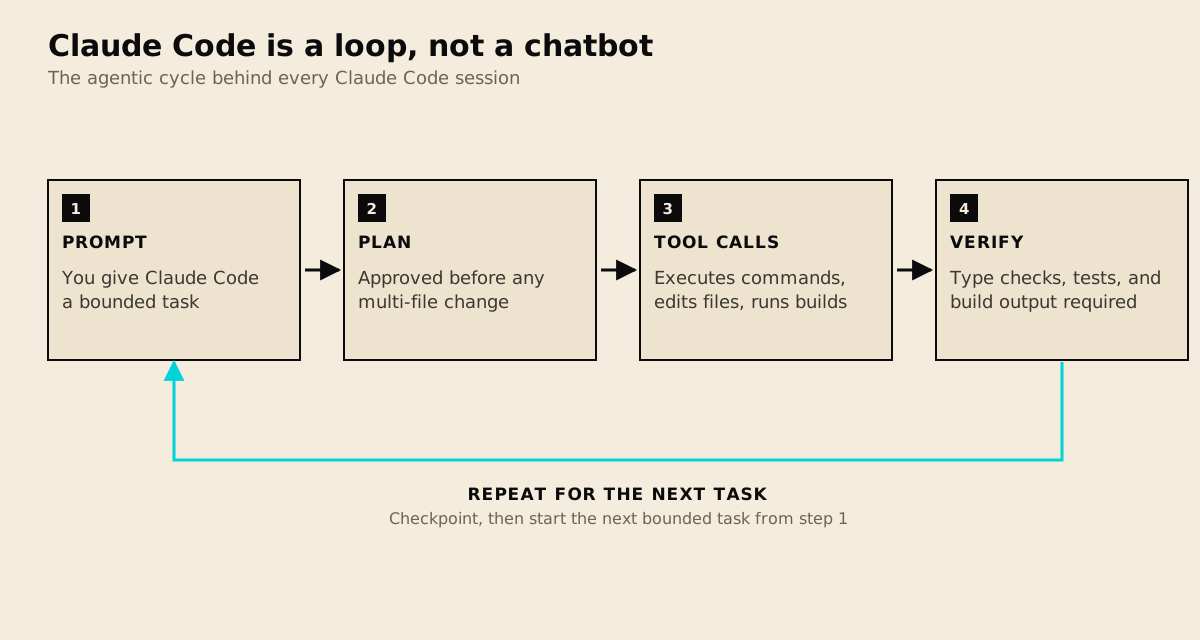
Claude Code doesn’t just answer once. Each task cycles through planning, tool calls, and evidence-based verification, then the loop repeats for the next bounded task instead of ending the conversation. That cycle, not the chat window, is the mental model for the rest of this guide.
How is this Claude Code guide organized?
This guide is organized into four core areas:
Quality Control
- Two-gate system
- Evidence-based completion
- Phrase blocking
Context Management
- Dev docs workflow
- Preventing amnesia
- Session continuity
Token Optimization
- Progressive disclosure
- 60% savings
- Skill loading
Practical Patterns
- RAG fundamentals
- Debugging workflows
- Production deployment
What is the minimum production-safe Claude Code workflow?
The minimum production-safe workflow is plan, implement, verify, and preserve state. Plan before multi-file work. Implement one bounded unit. Verify it with a diff and the cheapest reliable test. Preserve decisions in dev docs before the context is compacted or the session ends. Skipping any one of these stages creates a predictable failure: architectural drift, oversized changes, unsupported completion claims, or lost context.
Model selection belongs inside that workflow rather than above it. Choose the Claude model and effort tier by workload. Since Opus 5.5 shipped, my Opus 5.5 vs Fable 5.1 cost-per-turn replay shows Fable now costing 2.3x Opus per turn on my measured day. Then preserve the result with the complete three-file context-compaction workflow. The system has been exercised in a 36,000-line trading-bot case study and in evidence-gated automation for security workflows.
How Does the Two-Gate System Prevent Broken AI Code?
Gate 0 validates your context budget and loads phrase blocking to prevent “should work” claims. Gate 1 analyzes your query and activates the relevant skills from a library of 30-plus defined patterns. Both gates must pass before any implementation tools unlock, making unverified confidence structurally impossible rather than something that relies on discipline.
Part 1: Quality Control That Actually Works
The biggest mistake in AI-assisted development is accepting confidence as evidence.
When Claude says “should work,” that’s not verification, it’s a guess. The two-gate system I built makes guessing impossible by blocking all implementation tools until quality checks pass.
The Core Principle
Gate 0: Meta-Orchestration
- Validates context budget (under 75%)
- Loads quality gates and phrase blocking
- Initializes the skill system
Gate 1: Auto-Skill Activation
- Analyzes your query intent
- Matches against 30+ defined skills
- Activates top 5 relevant skills
Only after both gates pass can you write code. Like buttoning a shirt from the first hole, skip it, and everything else is wrong.
Evidence Over Confidence
These phrases get blocked:
| Red Flag | Problem |
|---|---|
| “Should work” | No verification |
| “Probably fine” | Uncertainty masked as completion |
| “I’m confident” | Feeling, not fact |
| “Looks good” | Visual assessment, not testing |
Replace with evidence:
Build completed: exit code 0, 9.51s
Tests passing: 47/47
Bundle size: 287KB
For the complete verification system including the 84% compliance protocol, see the full quality control guide.
How Do You Stop Claude From Forgetting Context Between Sessions?
Create three dev doc files for every non-trivial task: plan.md as the approved implementation blueprint, context.md as a living record of current progress and key decisions, and tasks.md as a granular checklist. Before context compacts, run /update-dev-docs. After compaction, say “continue” and Claude reads the files automatically, no re-explaining required.
Part 2: Context Management
“We already discussed this.”
I said it. Claude didn’t remember. Thirty minutes of context, file locations, decisions, progress, gone after compaction.
The dev docs workflow solves this permanently.
The Three Dev Doc Files
Every non-trivial task gets a directory:
~/dev/active/[task-name]/
├── [task-name]-plan.md      # Approved blueprint
├── [task-name]-context.md   # Living state
└── [task-name]-tasks.md # Checklistplan.md: The implementation plan, approved before coding. Doesn’t change during work.
context.md: Current progress, key findings, blockers. Updated frequently.
tasks.md: Granular work items with status. Check items as you complete them.
The Magic Moment
[Context compacted]
You: "continue"
Claude: [Reads dev docs automatically, knows exactly where you are]
No re-explaining. No lost progress. Just continuation.
When to use dev docs:
- Any task taking more than 30 minutes
- Multi-session work
- Complex features with multiple files
- Anything you’d hate to re-explain
For the complete workflow including 16 automation hooks, see the context management guide.
Part 3: Token Optimization
Most Claude configurations load everything upfront. Every skill, every rule, every example, thousands of tokens consumed before you’ve asked a question.
Progressive disclosure flips this.
Tokens also decide how fast a Pro or Max plan runs out, because Claude Code shares one usage limit with claude.ai. Claude usage limits explains the five-hour session and the weekly cap, Claude Code usage limits covers what burns that limit inside Claude Code, and Claude pricing lists every plan and API price.
The 3-Tier System
| Tier | Content | Tokens | When Loaded |
|---|---|---|---|
| 1 | Metadata | ~200 | Immediately |
| 2 | Schema | ~400 | First tool use |
| 3 | Full | ~1200 | On demand |
Tier 1: Skill name, triggers, dependencies. Just enough to route the query.
Tier 2: Input/output types, constraints, tools available.
Tier 3: Complete handler logic, examples, edge cases.
The meta-orchestration skill alone: 278 lines at Tier 1, 816 with one reference, 3,302 fully loaded. That’s 60% savings on every session that doesn’t need the full content.
For implementation details and your own skill definitions, see the token optimization guide.
Part 4: Foundational Concepts
Before building complex AI workflows, you need to understand the underlying patterns.
RAG: Retrieval-Augmented Generation
RAG gives LLMs access to external knowledge at inference time. Introduced in a 2020 Meta AI paper and now foundational to production AI systems, RAG pulls in relevant documents before generating, rather than relying solely on training data with a fixed knowledge cutoff.
The pattern:
- Query Processing → 2. Retrieval → 3. Augmentation → 4. Generation
Every time you feed context to Claude before asking questions, you’re using RAG. The dev docs workflow is essentially manual RAG, retrieving your context files before generation.
Evidence-Based Verification
“Should work” is the most dangerous phrase in AI development. It indicates confidence without evidence.
The forced evaluation protocol:
- EVALUATE: Score each skill YES/NO with reasoning
- ACTIVATE: Invoke every YES skill
- IMPLEMENT: Only then proceed
Research shows 84% compliance with forced evaluation vs 20% with passive suggestions. The commitment mechanism creates follow-through.
What Are the Most Common Claude Code Mistakes to Avoid?
Four mistakes account for most Claude Code failures: writing context in chat instead of files, using Claude to make decisions rather than execute bounded tasks, skipping gate checks when tired or rushed, and letting sessions run for hours without checkpointing. The last one degrades output quality as abandoned approaches and recovered errors accumulate in the context window.
Part 5: Common Failure Modes
After building the quality control system, I’ve watched colleagues start using Claude Code and make the same mistakes. These are the ones worth knowing before you hit them.
Treating every task as a conversation
Claude Code’s memory resets at the start of each session. Most people know this. But they still write context in chat messages instead of files. “Remember that we’re using PostgreSQL, not MySQL” gets lost when context compacts. Write it in a file once, reference the file every session.
The dev docs workflow exists precisely for this. Before any significant session, start with: “Read context.md and give me a brief on where we are.” Five seconds, no lost context.
Using Claude for decisions instead of execution
Claude Code is a tool for doing things, not deciding what to do. If you’re asking it “should I use Redux or Zustand?” or “is this architecture good?”, you’re using it wrong. Make the decision yourself (or with a separate research session), then give Claude Code a clear, bounded task.
The clearer your input, the higher the quality of your output. “Implement a Redux store for auth state with these specific actions” produces better results than “help me set up state management.”
Skipping the gate check when tired
The two-gate system works when you follow it and fails immediately when you skip it. The temptation to skip is highest when you’re tired, rushing, or “just need to make one small change.” That’s exactly when it matters most. Small unverified changes in tired states are where production bugs come from. In my Claude Code trading bot, this system caught 8 silent bugs over four months before any of them touched live capital.
The gate isn’t bureaucracy. It’s the system protecting you from yourself at 11 PM.
Letting context balloon without checkpointing
A session that starts with a clear task and runs for three hours without checkpointing will start producing worse results as context fills. Claude Code sees everything in the window, including the tentative approaches you abandoned, the errors you hit and recovered from, the exploratory tangents. All of that degrades signal.
Checkpoint every 45–60 minutes on long tasks. Run /update-dev-docs. The next sub-session starts clean. Quality stays high.
Part 6: Adapting to Your Stack
The gates, dev docs, and progressive disclosure patterns work across stacks. But how you apply them varies by project type.
SvelteKit + Static Sites
The context file structure for a SvelteKit project should reflect the routing model. Your context.md should document which routes are prerendered, which are server-side, and which are client-side, because Claude will make different assumptions about data loading depending on what it thinks the rendering strategy is.
One mistake I made early: assuming Claude remembered that a specific route was prerendered. It didn’t. Every session it would suggest server-side loading patterns that don’t apply to static routes. A two-line note in context.md, “route /blog is prerendered, no server hooks, use data exported from +page.ts”, eliminated that class of confusion entirely.
The build gate matters more for SvelteKit than some other stacks because the static adapter has strict requirements. Dynamic imports, server-only code in client components, and missing types cause build failures that don’t surface in dev mode. Make pnpm build non-negotiable before marking any task complete.
Next.js App Router
The App Router’s server component versus client component distinction is the most common source of confusion in Claude Code sessions. Claude will occasionally suggest a hook or browser API inside a server component, or vice versa.
Capture the component hierarchy in your context.md: which components are server components (no 'use client'), which are client components, and which are shared utilities. This isn’t excessive documentation, it’s the exact information Claude needs to avoid the most common class of error.
Evidence gate addition for Next.js: add tsc --noEmit to your gate checklist. TypeScript errors in App Router code often don’t surface until type-checking because the dev server is permissive.
Pure API Projects
API-only projects benefit most from the dev docs workflow because the relevant context is all in files, no visual output to check, no screenshots, just data shapes and endpoint contracts.
Your context.md for an API project should always include: the current database schema, the authentication model, and the active endpoints with their expected inputs and outputs. Keep it to one page. If it’s longer, you’re capturing implementation details that belong in code comments, not context.
For evidence gates, add a smoke test to the checklist: one curl command per major endpoint that should return a 200. Not comprehensive integration tests, just enough to confirm the service is responding correctly before you consider the session complete.
Long-Running Projects
The three-file dev docs structure was designed for task-level work, features and bug fixes that complete in days. For projects that run months, add a fourth file: project-context.md.
project-context.md captures what doesn’t change session-to-session: the architectural decisions, the tech stack choices and the reasons for them, the non-negotiable constraints, and the vocabulary the codebase uses. What the project calls “users” versus “accounts” versus “members” matters more than you’d expect.
This file gets read at the start of every session, before context.md. It’s the stable foundation that prevents Claude from proposing changes that would violate architectural constraints established months ago.
The investment: 30 minutes once, saved every session for the life of the project.
Getting Started
If you would rather start from a preconfigured baseline than build this by hand, the Claude Code setup kit packages the structure below.
Minimum Viable Setup
- Create a CLAUDE.md in your project root with basic gate enforcement
- Set up a dev/ directory for task documentation
- Add “continue” handling to resume after compaction
Full Setup
- Install the dev docs commands (slash commands or aliases)
- Configure hooks for automatic skill activation
- Set up build checking on Stop events
- Create workspace structure for multi-repo projects
The full system takes a few hours to configure. But it saves that time on every long task thereafter.
Related Guides
Claude Code Fundamentals
- Quality Control System - Two-gate enforcement, phrase blocking
- Context Management - Dev docs, automation hooks
- Token Optimization - Progressive disclosure, 60% savings
Foundational Concepts
- What is RAG? - Retrieval-augmented generation explained
- Evidence-Based Verification - Why “should work” fails
2026 Update: Computer Use and Browser Automation
Claude Code now supports computer use through MCP (Model Context Protocol) tools. This means Claude can control your desktop, browser, and applications directly from the terminal.
MCP servers also feed Claude framework knowledge it would otherwise guess at. For one worked example, see the official Svelte MCP server and what its autofixer found in 134 SvelteKit components.
What Computer Use Enables
- Browser automation: Navigate websites, fill forms, click buttons, and extract data through Chrome DevTools integration
- Desktop control: Launch applications, take screenshots, type text, and interact with native UI elements
- Multi-tool orchestration: Combine file editing, terminal commands, and browser automation in a single workflow
Setting Up Computer Use
Computer use requires the Claude in Chrome extension and the computer-use MCP server. Once connected, Claude can:
- Open URLs and navigate between pages
- Read page content and execute JavaScript
- Fill forms and submit data
- Take screenshots for visual verification
- Control desktop applications via accessibility APIs
Practical Applications
The combination of terminal access and browser control creates workflows that were previously impossible:
- Deploy and verify: Push code to production, then open the browser to visually confirm the deployment worked
- SEO auditing: Check meta tags, structured data, and page content across multiple URLs programmatically
- Form testing: Fill out multi-step forms to verify validation logic and submission flows
- Cross-platform automation: Edit code in the terminal, test it in the browser, and document results, all in one session
This represents a shift from Claude Code as a coding assistant to Claude Code as a full development environment that spans terminal, editor, and browser.
Hooks: Automating Quality Gates
Claude Code hooks let you run custom scripts at specific lifecycle events: PreToolUse (before a tool runs), PostToolUse (after a tool runs), Notification, and Stop. This turns manual quality checks into automated enforcement.
For example, a PreToolUse hook can block file writes to production config files. A PostToolUse hook can run linting after every code edit. A Stop hook can enforce that the build passes before the session ends.
The hook script receives event data on stdin and must return JSON with {"continue": true} to proceed. Here is a minimal Stop hook that checks the build:
{
  "hooks": {
    "Stop": [{
      "type": "command",
      "command": "/bin/bash ~/.claude/scripts/check_build.sh"
    }]
  }
}
Hooks are configured in ~/.claude/settings.json and run synchronously (blocking) or asynchronously (fire-and-forget) depending on the event type. For a complete implementation walkthrough, see Claude Code Hooks Tutorial.
To choose between a hook, a skill, a subagent and a CLAUDE.md line, see Claude Code skills vs subagents. To write your first skill, see Claude Code skills. If your repo also keeps an AGENTS.md, Claude Code and AGENTS.md covers how the two files load.
Multi-Agent Orchestration
Claude Code supports spawning sub-agents for parallel task execution. Each agent runs in its own context with access to specified tools, and results flow back to the parent session.
Common patterns:
- Parallel search: Spawn multiple Haiku agents to explore different parts of a codebase simultaneously
- Build and test: Run a build-fixer agent alongside a test-runner agent after making changes
- Code review pipeline: Use a Haiku triage agent for fast first-pass review, then an Opus agent for deep analysis on flagged items
Agent isolation via git worktrees prevents concurrent agents from corrupting each other’s file changes. Read-only agents (exploration, review) do not need isolation. Write agents always should use it.
The Gate-Receipt Pattern: Quality Gates That Survive Automation
Quality gates that need judgment, like whether content reads as human-written or a title survives mobile truncation, run as Claude-invoked skills that need a live session. Cron jobs have none. The gate-receipt pattern bridges them: the skill writes a small receipt file when it runs, and the automated script refuses to proceed without a passing one.
Concretely: when the gate skill finishes, it writes gate-receipts/<item>.json with its verdict and score. The cron-runnable pipeline reads that file before any irreversible step (publishing, submitting, deploying) and blocks if the receipt is missing or marks a failure. The judgment happens in the session where it belongs; the determinism happens in cron where it scales.
Without this, you get one of two bad outcomes: drop the subjective gate and let an unattended pipeline ship slop, or block the whole pipeline on a human and lose the automation. The receipt is the contract between the two layers, and it is the only way I have found to put a judgment call inside a job that runs with nobody watching.
The Bottom Line
Claude Code isn’t just a code generator. With the right systems, it becomes a quality-controlled collaborator.
The goal isn’t trusting AI less. It’s trusting evidence more, and building systems that make “should work” impossible to accept.
Start with dev docs. Add the gate system. Implement progressive disclosure. Each piece builds on the last.
The AI was always capable. We just needed guardrails that made evidence the only path forward.

WORK WITH ME · SAME PROCESS, YOUR REPO
If your team re-checks AI output by hand before every deploy, you are paying twice for the same work. I build custom Claude Code pipelines, $2,000 to $5,000 with a written scope and a fixed quote, that wire these hooks, gates, and multi-agent workflows directly into your repo. See how the engagement works.